
Let me begin by stating that I am SUPER excited about Artificial Intelligence (AI) and the possibilities that it provides. The ability of these tools to create images, text, music, computer code, etc. is just mind boggling. But the thing to remember is that it isn't sentient. It's not reasoning. It's simply following a model that was created by human beings. There's a saying that I am quite fond of, "AI won't replace humans, but humans with AI will replace humans without AI." Chew on that for a moment. You may have noticed that I refer to AI tools as "it". I can't help it. Soon I'll refer to "it" as "Hal", or "Angela", or "Smith". Sci-fi fans will get that one. (My geek propeller is spinning today!)
AI is more than a fad. It's here to stay. If you believe differently then you are going to be the replaced human in the saying above. The threat to you doesn't come from a robotic time traveler, it's from competitors who are embracing this technology and using it to gain a competitive advantage over you. Every day people are leveraging AI technology to perform tasks more quickly, more accurately (sometimes), and with more focus. Another one of my favorite AI sayings is "Today's AI is the worst that you will ever use." Simply put, the AI tools you are using today are going to be less powerful than the tools you use tomorrow, next week, next month, next year, etc. The pace at which these tools are evolving is truly staggering. In fact:
- 35% of businesses have adopted AI.
- 77% of devices in use feature some form of AI.
- 9 out of 10 organizations support AI for competitive advantage.
- By 2030, AI will contribute $15.7 trillion to the global economy.
- By 2025, AI will eliminate 85 million jobs, but wait for it, but will add 97 million news ones, for a net gain of 12 million.
- The fastest growing consumer app in history is...drum roll...ChatGPT. It took only 2 months to hit 100 million users after launch.
These are some staggering statistics and lend credence to the saying "AI won't replace humans, but humans with AI will replace humans without AI." Considering these statistics, I am certain you can see why.
But companies aren't just embedding AI within their products for their customers to use, they're also using it to streamline their operational processes which creates additional competitive opportunities for them. They're using AI to bring products to market more quickly, to generate personalized messages, to conduct research, etc. The possibilities for leveraging AI to assist in operational processes are endless.
Which leads me to the topic of this post, how does/will/can/should AI benefit a Product Manager? This isn't going to be a narrative on how to incorporate AI into your application (maybe in another post). Instead I'm going to provide a few examples of how a Product Manager might use AI to assist in some of the day-to-day tasks that a Product Manager performs.
This is going to be a long post, so grab a coffee and get comfortable.
In Preparation
To illustrate the power of artificial intelligence to the Product Manager, I'm going to run through a scenario. As a Product Manager, I have the most amazing idea for a new product. But I first want to explore the viability of this idea. Assuming there is product potential, I want to prepare a few requirements and designs. I should probably come up with a a POC to further test my idea and help me shop it around the org and with prospective customers.
Now before I dig in, "yes" this is a simplistic example. But hopefully it will demonstrate the value of AI as you interact with the tool and tease apart your idea and the results provided by the tool. Keep asking questions and keep exploring.
For this example, I am using ChatGPT 4 which is available in the paid version of ChatGPT, but this example works just as well in the free version of ChatGPT which is 3.5. (Disclaimer: As of this writing. I did mention that things change quickly in this space.). I'd highly recommend you spend the $20 per month for the paid version to take advantage of ChatGPT 4 which provides more recency in the data set, which is also larger than 3.5.
I'm going to present ChatGPT prompts along with the output generated from each prompt. A prompt is how you interact with a generative AI tool and is simply your request to the tool. The format of these requests is critical to receive the response you are looking for. Prompt engineering is a skill unto itself and is the process of designing and refining prompts, to get specific responses from AI models. It's bridges the gap between human intent and machine output. If you don't get the response you expected, try rewording your prompt. The more information you can provide, the better (usually) your result will be. These prompts should also work equally as well in other generative AI tools.
If you'd like to learn more about prompt engineering, here is a good resource with access to a lot of material on the subject. A quick Google search will also return a ton of free and paid options.
OK, I could go on an on pontificating about prompt best practices, but this post is about how AI can assist a Product Manager, so I'll get on with it.
The one other thing I will call out before diving in is to verify the information returned. Answers are not always accurate and these inaccuracies are referred to as hallucinations. Generative AI is a wonderful tool, but it is not always correct. I view it as an intern. A great help to get things started and moved down the road, but I'm going to validate the work. (No offense to any interns who might be reading this.)
My Idea
My game changing idea is "a mobile application targeted at younger generation users to assist them in locating volunteer opportunities that resonate with their interests and passions."
Great. Now that I have my idea, it's time to use ChatGPT to determine the feasibility of my idea. The following are actual interactions (prompts) with ChatGPT and the results returned to me. Feel free to try the prompts yourself and adjust them to see the impact your changes have on the response provided. Hint: you can simply paste the prompts into ChatGPT and see the results for yourself, instead of having to read the results below. Prompts appear at the top of each section are are indicated by ChatGPT -> followed by the prompt which appears in italics.
Idea Feasibility
Does my idea have potential? What do the user personas look like? How big is my total addressable market? How much money could my product generate? Let's ask ChatGPT.
ChatGPT -> Acting as a Product Manager, create a product strategy for a new product, a mobile application that allows volunteers to find volunteer opportunities and sign up for them. The mobile application should target millennial and gen-z users. The product strategy should include user personas, the business problem, business objectives, total addressable market, and potential revenue.
*** RESULT ***
Product Strategy for a Volunteer Matching Mobile Application
1. User Personas
- Ava, The College Activist (Gen-Z):
- Demographics: 20 years old, college student, active in social causes.
- Behaviors: Uses social media extensively, prefers quick, simple sign-up processes, values community and social impact.
- Needs: Wants to find volunteer opportunities that align with her academic schedule and interests in environmental and social justice causes.
- Liam, The Young Professional (Millennial):
- Demographics: 28 years old, works in tech, looking to give back to the community.
- Behaviors:** Tech-savvy, seeks efficiency and flexibility, values professionalism and well-organized events.
- Needs: Looks for weekend volunteer opportunities, prefers opportunities that help build professional skills or network.
2. Business Problem
- Issue: Many millennials and Gen-Z individuals are interested in volunteering but struggle to find opportunities that fit their interests, skills, and schedules.
- Impact: This disconnect limits the engagement and contribution of a significant portion of the population in volunteer work.
3. Business Objectives
- Engage Users: Make it easier for young people to find and sign up for volunteer opportunities that match their interests and availability.
- Support Organizations: Provide non-profits and other organizations access to a motivated, young volunteer base.
- Build Community: Foster a community of volunteers who can share experiences, advice, and encouragement.
** 4. Total Addressable Market (TAM)**
- Initial Market (U.S. only): Based on data, there are approximately 30 million millennials and Gen-Z individuals interested in volunteering.
- Global Expansion: With global internet penetration growing, the app can expand to other regions increasing the TAM to over 100 million potential users.
5. Potential Revenue Streams
- Freemium Model: Basic access for free with premium features such as advanced matching algorithms, skills-based placements, and verified volunteer hours.
- Partnerships: Charge organizations a fee for premium listings, recruitment services, and analytics about volunteer engagement and effectiveness.
- Advertisements: Targeted ads from socially responsible companies offering products or services that appeal to young, socially conscious consumers.
Conclusion
This product strategy focuses on bridging the gap between young volunteers and organizations needing assistance, leveraging technology to enhance user experience and organizational reach. By prioritizing a seamless user interface and targeted features that resonate with millennials and Gen-Z, the app aims to not only increase volunteer engagement but also provide substantial support to non-profit ecosystems, ultimately driving both social impact and business success.
Expand on a Response
That was an interesting response, but I don't quite follow the revenue suggestions. I'd like more information about that specifically. ChatGPT remembers your previous interactions and results (called context), so you can refer back to this information in subsequent requests.
ChatGPT -> Expand on bullet 5. (Potential Revenue)
*** RESULT ***
Expanded Potential Revenue Streams for the Volunteer Matching Mobile Application
1. Freemium Model
- Basic Access: Free access to basic features, such as browsing volunteer opportunities, signing up for events, and basic profile creation. This level encourages mass adoption and user base growth.
- Premium Features: Subscription-based access to enhanced features designed to improve the volunteering experience:
- Advanced Matching Algorithms: Personalized suggestions for volunteer opportunities based on user interests, skills, and past volunteering history.
- Skills-Based Placements: Opportunities that align with users' professional skills and career aspirations, potentially in collaboration with career development professionals.
- Verified Volunteer Hours: Integration with blockchain or digital certificates to verify and log volunteer hours that users can use for academic credits, resumes, or job applications.
2. Partnerships
- Organization Subscriptions: Offer tiered subscription plans for organizations that include:
- Premium Listings: Higher visibility in search results and promotional spaces within the app.
- Recruitment Services: Access to a pool of volunteers filtered by specific skills or interests, along with tools to manage applications and select candidates.
- Analytics and Reporting: Data insights on volunteer engagement levels, effectiveness, and demographic analytics to help organizations optimize their volunteer outreach.
- Corporate Sponsorships: Engage corporations looking to enhance their corporate social responsibility (CSR) image by sponsoring specific volunteering events or series of activities, potentially matching their employees with these opportunities.
3. Advertisements
- Targeted Advertising: Sell ad space to businesses whose products or services align with the values and interests of the young, socially conscious user base. This could include:
- Eco-friendly Products: Sustainable goods and services from companies that practice ethical production methods.
- Educational Tools: Online courses, workshops, and webinars that help users develop new skills or enhance existing ones.
- Health and Wellness: Products and services focused on mental and physical well-being, appealing to users' interest in a balanced lifestyle.
4. Event and Workshop Fees
- Educational Workshops: Organize and host workshops that focus on skill development, career advice, or personal growth, which could be free for premium members or available at a cost for basic users.
- Volunteer Events: Charge a nominal fee for exclusive volunteer events that offer unique experiences or opportunities to work with high-profile organizations.
5. Affiliate Marketing
- Partnership Deals:** Collaborate with brands and services that resonate with the app’s audience. For example, offering discounts or special offers on products, travel deals for volunteers who need to travel as part of their volunteer work, or educational materials relevant to non-profit work.
Conclusion
Expanding on these revenue streams can create a robust business model for the volunteer matching app, capitalizing on the strong social engagement of millennials and Gen-Z users while also providing value to organizations and businesses aligned with social impact goals. This strategy not only sustains the application financially but also enhances its value proposition to all stakeholders involved.
Create a List of Recommended Features
It definitely sounds like this idea has some legs. For an application like this, what features would a user expect to see?
ChatGPT -> _Using the Kano model, prepare list of features for my application. _
*** RESULT ***
The Kano Model is a useful tool for categorizing product features based on how they are perceived by customers and their effect on customer satisfaction. This model classifies features into five categories: Must-Haves, Performance, Attractive, Indifferent, and Reverse features. Here’s a tailored breakdown for your volunteer matching mobile application targeting millennials and Gen-Z users:
1. Must-Have Features
These are basic features that users expect in the app. Their absence would result in dissatisfaction:
- User Profile Creation: Allows users to create and edit their profiles, including basic personal information, interests, and skills.
- Search and Filter Options: Basic search functionality to find volunteer opportunities by location, date, and category.
- Sign-Up for Opportunities: Ability for users to sign up for volunteer opportunities directly through the app.
- Privacy and Security: Robust data protection measures to secure personal information.
2. Performance Features
These features increase customer satisfaction as they improve in performance. Users are happier as these aspects are enhanced:
- Calendar Integration: Syncing with users’ personal calendars to manage their volunteer schedules.
- Notifications and Reminders:** Automated alerts for upcoming volunteer events and new opportunities matching user preferences.
- Real-Time Updates:** Immediate updates on new or changed volunteering opportunities.
- Mobile Optimization:** Ensuring the app is fast, responsive, and reliable across all devices.
3. Attractive Features
These are features that are not expected by the user but can cause a high degree of satisfaction and can differentiate the app from competitors:
- Gamification: Reward systems such as badges or points for completing volunteering milestones or challenges.
- Social Sharing: Ability to share volunteer experiences and upcoming events on social media directly from the app.
- Interactive Map: A visual map showing volunteer opportunities in different areas, which can also suggest events based on the user’s location.
- Volunteer Impact Metrics: Visual analytics showing the impact of the user’s volunteer work (e.g., hours contributed, projects completed).
4. Indifferent Features
Features in this category neither significantly increase nor decrease customer satisfaction. They are typically unnoticed:
- Multi-language Support: While useful in a diverse community, it might not be essential for all users.
- Customizable App Themes: Options to change app appearance, which might not be crucial for functionality.
5. Reverse Features
Features that could lead to user dissatisfaction if implemented, possibly because they complicate the user experience or are misaligned with user expectations:
- Invasive Push Notifications: Overly frequent or irrelevant notifications might annoy users.
- Mandatory Social Logins: Forcing users to log in through social media could be a deterrent due to privacy concerns.
Conclusion
Organizing features according to the Kano model helps prioritize development and ensure that the volunteer matching app meets and exceeds user expectations. It focuses on delivering value through essential features while innovating with attractive features to engage and excite users.
What Do My Competitors Look Like
I'm sure I'll have a few competitors in the market. ChatGPT could provide a list of them, but I already know who they are. What I'd really like to know is their product strengths and where do I have an opportunity to differentiate my product?
ChatGPT -> Generate a list of potential competitors such as POINT, VolunteerMatch, dosomething.org, and catchafire.org. Present this information in a table comparing how strong these competitors are across features. Be sure to include the features from my application in the comparison.
*** RESULT ***
Below is a comparative analysis of potential competitors in the volunteer matching mobile app space. The table compares POINT, VolunteerMatch, DoSomething.org, and Catchafire.org across various features that align with those discussed for your app using the Kano model. This comparison will help identify areas where your app can differentiate itself or needs to meet industry standards.
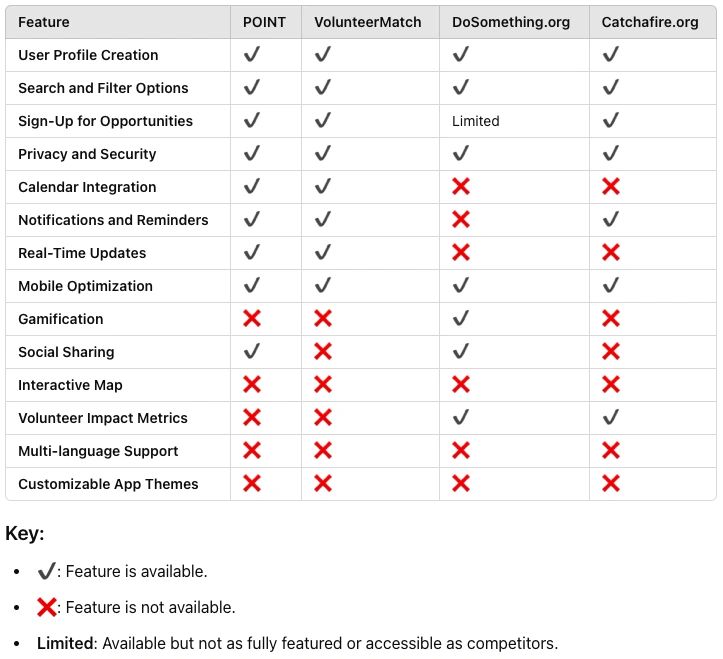
Analysis:
- Common Strengths: All competitors offer basic functionalities such as user profile creation, search and filter options, sign-up for opportunities, and mobile optimization, making these must-have features for your app to be competitive.
- Unique Opportunities: Features like gamification, interactive maps, and volunteer impact metrics are less commonly offered across these platforms. Your app could potentially stand out by incorporating these attractive features effectively.
- Potential Improvement Areas: While notifications and real-time updates are relatively common, they are not universally implemented. Enhancing these features could improve user engagement and satisfaction.
- Niche Features: Offering multi-language support or customizable app themes might not be essential but could serve specific markets or user preferences, adding a subtle competitive edge.
Conclusion:
This analysis shows where your app can align with industry standards and where there are opportunities to innovate and differentiate from existing competitors. Integrating both essential and attractive features will be key to creating a compelling product for millennials and Gen-Z users.
Generate User Stories
Looks like I can really make a splash with my product if I focus on the right things. How about those user stories? Can ChatGPT help there? Check it out. (I also asked ChatGPT to explain the reasoning behind each story. You can do this with almost any request.)
CHatGPT -> Create detailed user stories for my application, and prioritize using the MoSCoW framework. Be sure to provide step by step reasons for each user story.
*** RESULT ***
To develop your volunteer matching mobile application, creating detailed user stories is crucial for guiding the development process and ensuring that all team members understand the requirements from a user perspective. I'll use the MoSCoW prioritization framework, which categorizes features into Must Have, Should Have, Could Have, and Won't Have at this time, to help prioritize the development tasks effectively.
Must Have
These user stories are critical for the app's launch and essential for basic functionality and user satisfaction.
User Story:
As a user, I want to create and edit my profile, so that I can share my interests and skills with volunteer organizations.
- Reasoning: Core functionality for personalization and ensuring users find relevant opportunities.
User Story:
As a user, I want to search and filter volunteer opportunities by location, date, and category, so that I can find events that match my availability and interests.
- Reasoning: Essential for usability and effectiveness of the app, impacting user adoption and retention.
User Story:
As a user, I want to sign up for volunteer opportunities directly through the app, so that I can easily participate in events.
- Reasoning: Fundamental for the app’s purpose, directly affecting its utility and user engagement.
User Story:
As a user, I want robust privacy and security for my personal information, so that I can trust the platform with my data.
- Reasoning: Critical for compliance and user confidence, essential in today’s digital landscape.
2. Should Have
These features are important but not critical for launch. They enhance user satisfaction and operational efficiency.
User Story:
As a user, I want to sync the app with my calendar, so that I can manage my volunteer commitments alongside my personal schedule.
- Reasoning: Increases functionality and appeal, making the app more user-friendly and integrated with everyday life.
User Story:
As a user, I want to receive notifications and reminders about my upcoming volunteer events, so that I can stay informed and prepared.
- Reasoning: Improves user experience by ensuring that users are engaged and aware of their commitments.
3. Could Have
These features would be nice to have if resources allow, providing additional user engagement and satisfaction but are not crucial for the initial launch.
User Story:
As a user, I want to earn badges and rewards for my volunteer activities, so that I feel motivated and recognized for my contributions.
- Reasoning: Adds a layer of engagement and incentive, potentially differentiating the app in a crowded market.
User Story:
As a user, I want to share my volunteering experiences on social media through the app, so that I can inspire friends and network to also volunteer.
- Reasoning: Enhances community building and organic growth through social proof and networking.
4. Won't Have at This Time
These are features that won’t be included in the initial release but might be considered in future updates.
User Story:
As a user, I want an interactive map to find volunteer opportunities, so that I can visually explore events around me.
- Reasoning: While useful for visual engagement and exploration, it is complex to implement and not critical for initial functionality.
By following this prioritization, the development team can focus on delivering a robust MVP that fulfills the core needs of users while leaving room for future enhancements based on user feedback and resource availability. This structured approach helps in managing resources effectively and ensuring that the most critical features are developed first.
Create a Wireframe Synopsis
From a design perspective, what screens should be included in the product and what interactions might the user take on each of those screens?
ChartGPT -> _For the must have features, generate a synopsis for wireframes, with descriptions for each screen. _
*** RESULT ***
Creating wireframes for the "Must Have" features of your volunteer matching mobile application will provide a visual guide for the design and development teams. Here’s a synopsis for wireframes, detailing each screen required to support these essential functions:
1. User Profile Creation and Editing
Screen 1: Welcome and Account Setup
Description: This screen welcomes users and prompts them to create an account. It includes fields for email, password, and an option to sign up using social media accounts for quicker integration.
Call to Action (CTA): "Sign Up" button, "Log In" link for existing users.
Screen 2: Profile Details
Description: After account setup, users enter their profile details, such as name, age, interests, and skills. This screen also includes options to add a profile picture and a brief bio.
CTA: "Save Profile" button, which saves the information and completes the profile setup.
Screen 3: Profile Edit
Description: Accessible from the main menu, this screen allows users to update or modify their profile information. It mirrors the Profile Details screen but pre-fills current user data.
CTA: "Update Profile" button.
2. Search and Filter Opportunities
Screen 4: Search and Filter
Description: Features a search bar at the top where users can enter keywords. Below the search bar, there are filter options such as date, location, and categories like education, health, environment, etc.
CTA: "Apply Filters" button which refreshes the list of opportunities based on selected filters.
3. Sign-Up for Opportunities
Screen 5: Opportunity Listings
Description: Displays a list of volunteer opportunities based on search and filter results. Each listing includes a brief overview, location, dates, and a thumbnail image.
CTA: "View Details" button for each listing.
Screen 6: Opportunity Details
Description: Shows detailed information about a selected volunteer opportunity, including a full description, requirements, time commitment, and any additional details.
CTA: "Sign Up" button to register for the opportunity, and a "Share" button to promote through social media.
4. Privacy and Security Settings
Screen 7: Privacy and Security Settings
Description: Allows users to manage privacy settings such as profile visibility, data sharing preferences, and security settings like password changes.
CTA: "Save Settings" button to apply any changes.
General Navigation and Design Elements
Top Navigation Bar: Present on all screens, includes icons for home, search, profile, and settings.
Bottom Navigation Bar: Includes quick access buttons to main features: Dashboard (home), Explore (search), Notifications, and My Profile.
Conclusion
These wireframes should focus on a clean, user-friendly interface that encourages interaction and ease of use, with clear CTAs and minimal design to ensure smooth navigation. Consistent elements like navigation bars enhance the user experience by making the app intuitive and efficient. These wireframes will serve as the foundation for the initial prototype testing and subsequent iterations.
Generate Prototype Code
SAY WHAT!!! I know. This is the part that blew my mind. ChatGPT can even generate code that you can load into a tool such as CodePen for a clickable prototype, or just click on the link it generates. Be advised, that this is a prompt that you will probably need to tweak multiple times to get exactly what you want. So here goes...
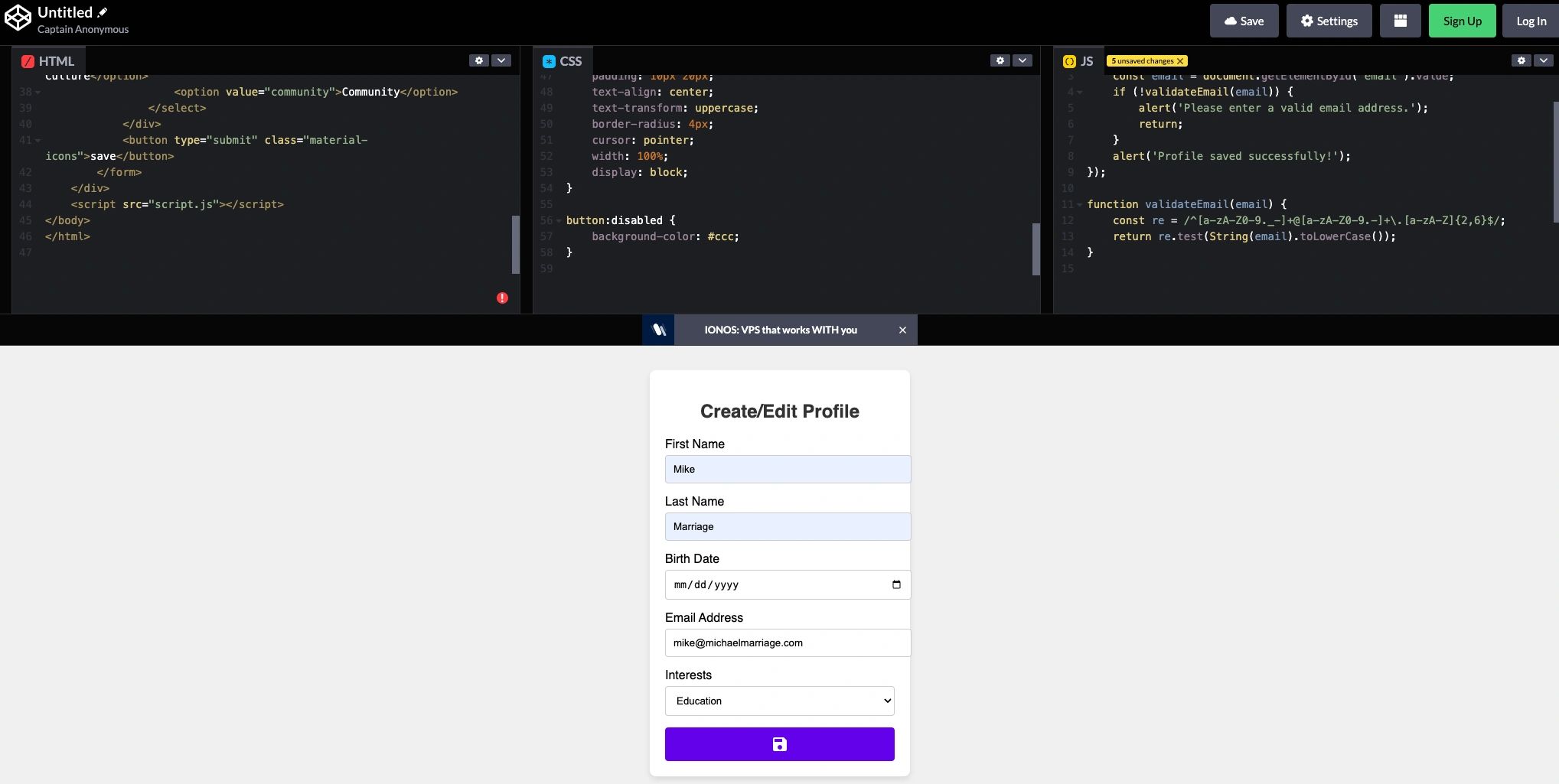
ChatGPT -> For the create and edit profile feature, generate a clickable prototype with HTML, CSS, JS. Be sure that all required functionality and relevant text appears in the prototype. Include first name, last name, birth date email address, and interests. The email address should be validated for proper email formatting. The interest field should be presented as a dropdown containing 6 interests that are important to my products target audience. Use material design principles in this prototype.
*** RESULT ***
I'm not going to paste all of the code that was generated, but below is the introduction and an image of the prototype based on the generated code, shown via CodePen.
To create a simple and functional clickable prototype for the "Create and Edit Profile" feature of your volunteer matching app, we can use HTML, CSS, and JavaScript. This prototype will incorporate Material Design principles to ensure a clean, modern aesthetic. Below is a basic implementation:
In Closing
I know that was a really long read, but I wanted to include all of the ChatGPT results so that you could see them. Kudos to you if you made it through all of that. A few closing notes on using AI to help streamline your product work.
- Verify the information provided by the tool. Watch for hallucinations.
- Provide as much detail as possible in your prompts.
- If you don't receive the information you expected, try rephrasing your prompt or provide additional detail.
- Ask for clarity or additional detail whenever you need it.
- Don't be afraid to make this a conversation between you and the tool. (Nobody is looking.)
- Verify the information provided by the tool. Watch for hallucinations.
- Verify the information provided by the tool. Watch for hallucinations. (I trust you're picking up what I'm putting down here.)
In case you were wondering, the above interaction with ChatGPT took about 20 minutes from start to finish. It really is a tool that has the potential to streamline many of our product processes. Exciting stuff!
Thanks for reading...and...I'LL BE BACK.
Mike
Previous
How Generative AI Is Reshaping Product Management
Next
Why Kindness Is a Strategy, Not Just a Trait
Continue exploring
July 21, 2026
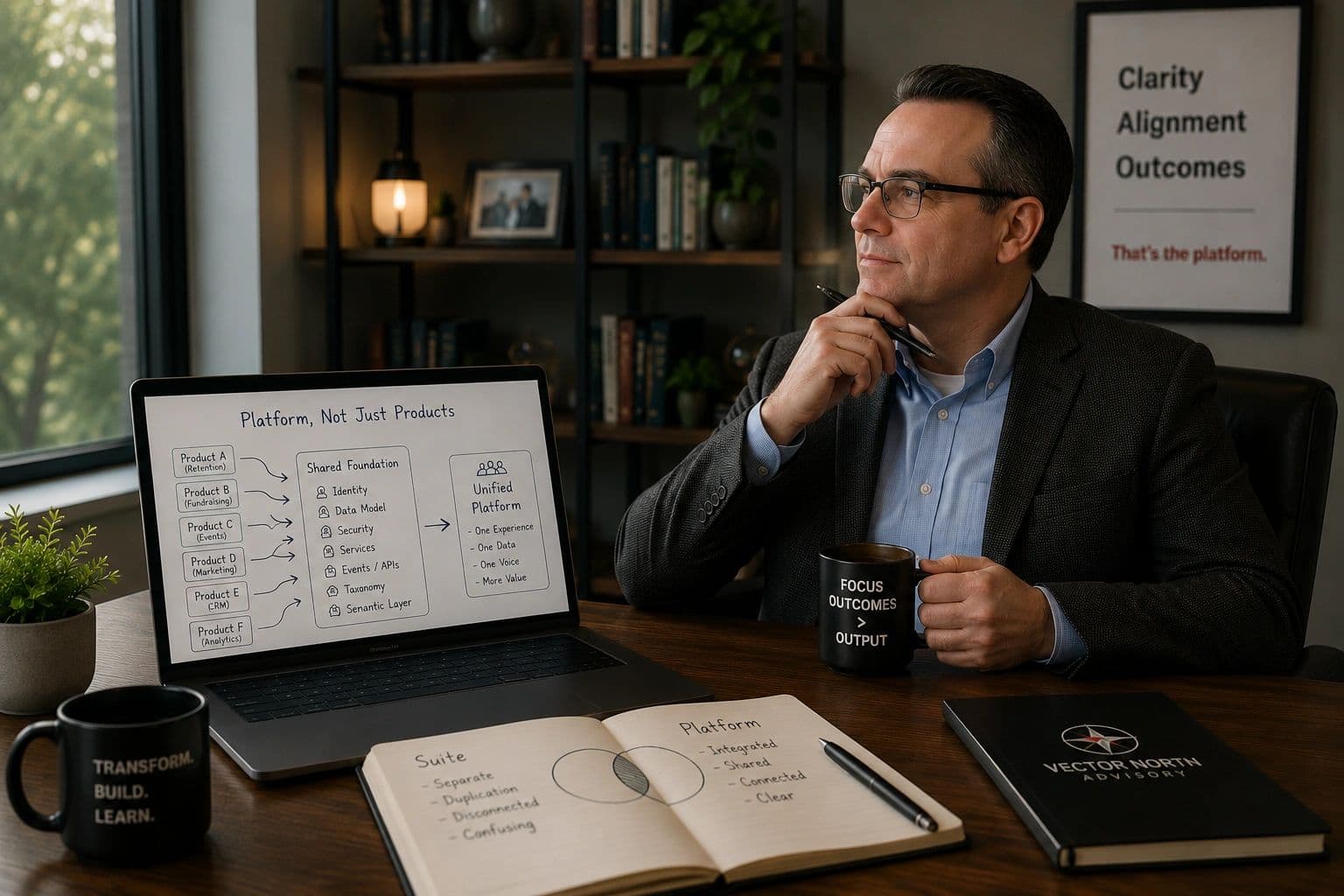
When a Suite Becomes a Platform
Spend enough time in enterprise software and you’ll eventually notice that certain words begin to lose their meaning. "Innovation" is one of them. "Transformation" is another. Lately, I think "platform" belongs on that l...

December 2, 2025
"AI Duct Tape" Isn't An AI Strategy
Why bolting AI on isn’t the same as building AI-first (and why your product can tell the difference).

August 17, 2026
When Architecture Becomes Experience
One of the more interesting things I’ve noticed over the years is that software companies and customers often define the word platform very differently.